

Data Security and Privacy in Health Apps You Actually Use
Dr. Adeyinka AdegbosinYou've just taken a basal body temperature reading before getting out of bed. The number feels personal because it is personal. It can sit beside your LH results, symptoms, weight and cycle history, creating a detailed picture of your body that deserves more than a vague promise to “keep it secure”.
Health apps turn ordinary moments into connected data journeys. A thermometer sends a reading to your phone, the app may synchronise it with a provider's systems, and a chart turns it into information you can act on. Understanding those stops makes data security and privacy less abstract, and helps you choose small controls without needing to become a cybersecurity specialist.
What Happens to a Single Reading From Your Device
Start with one morning BBT reading. You tap a thermometer, or use a device such as the Venus Smart Basal Thermometer for Ovulation, Bluetooth BBT Tracker with App, and the Venus Health app receives the measurement through Bluetooth. At this first point, the app needs to associate the reading with the correct account. A phone passcode and an app lock help prevent someone who picks up your phone from viewing it.
The reading may briefly sit in the app's working memory while the interface displays it. It can also remain locally on the phone while the device waits for an internet connection. Local storage should be protected by the phone's own security features, and the app should avoid keeping unnecessary copies. A simple example is a cached chart that remains visible after you've closed the app. If another person uses the phone, that convenience can become exposure.
Next, the app prepares the reading for synchronisation with the health provider's backend. During this movement, encryption in transit helps prevent someone from reading the information as it travels between the phone and the service. The server then validates the account, applies access rules and places the reading in a protected database. Encryption at rest matters here because stored data still needs protection if a storage system, backup or server component is accessed improperly.
The final path depends on the feature you use. The reading might be combined with other cycle information to render a chart, or made available to an authorised clinician or connected feature. Each onward movement should have a clear purpose and permission. For a practical example of how connected devices can become part of an everyday health routine, see how digital weighing scales fit into a fertility and wellness journey.
Practical rule: Treat every hand-off as a separate privacy moment. Ask what is collected, why it moves, who can access it and how long it remains available.
The Three States of Health Data and Why Each Matters
A BBT reading behaves like a private diary entry. While it sits on your phone or a server, it's data at rest, similar to a locked diary on a shelf. The lock represents encryption and access controls. If the shelf is copied or stolen, the contents should still be difficult to read.
When the app synchronises the reading, the information becomes data in transit. Think of a sealed envelope moving between post offices. The envelope still contains your private note, but protection during delivery helps stop someone on the route from opening it. In technical language, secure network connections, such as TLS, matter.
When the app calculates a trend or renders a fertility chart, the reading is data in use. It resembles an open notebook on a desk while someone reads or processes it. The app needs access to the value to show you something useful, but that access should be limited to the right account, feature or authorised professional.
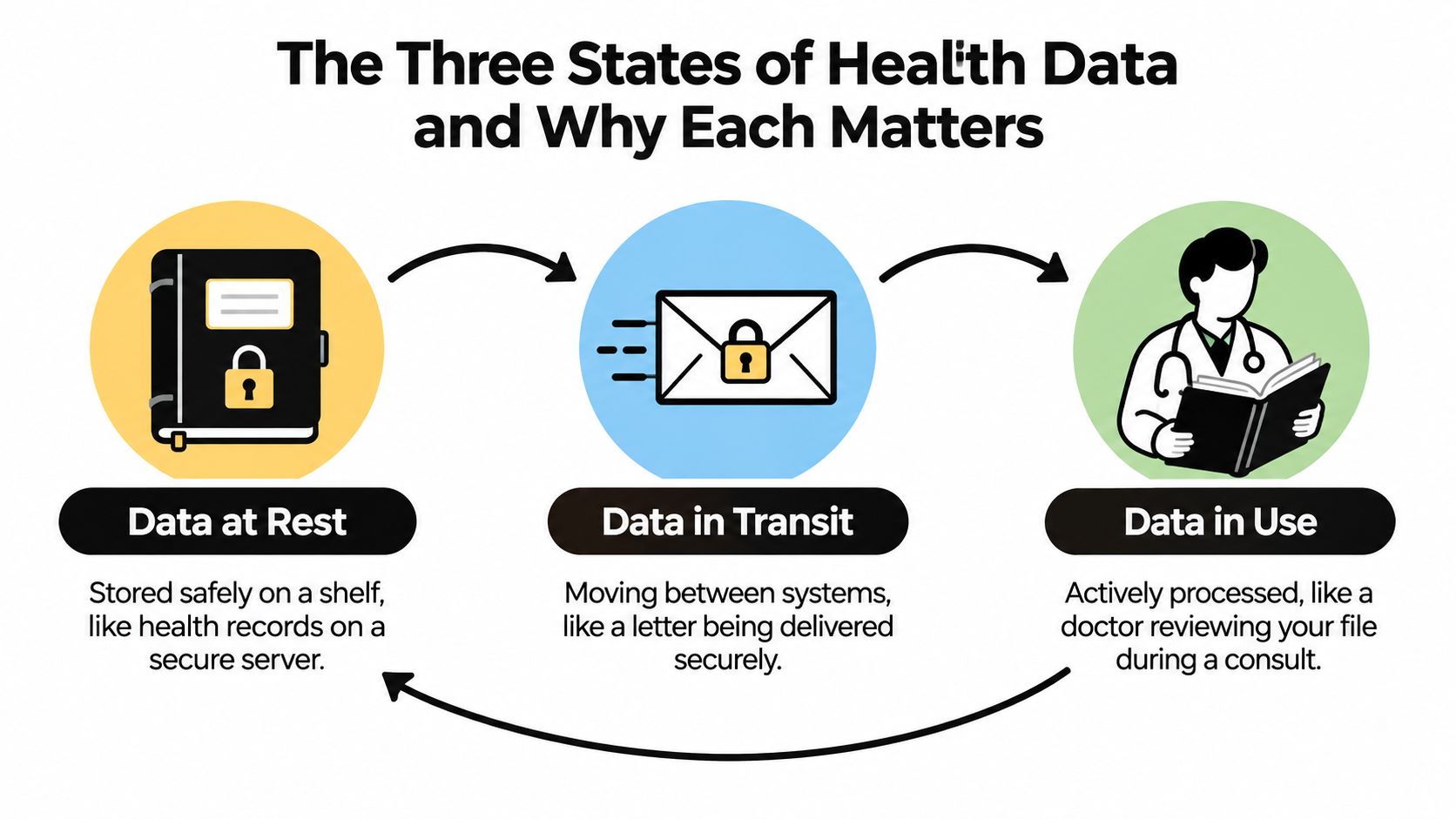
The three states overlap during ordinary use. A reading can be stored on the phone, travel to a server, be processed into a chart and then be stored again. That's why one safeguard can't cover the whole journey.
- At rest: encryption, secure backups, retention limits and device protection reduce the risk of stored readings.
- In transit: TLS protects the connection between the app and the service.
- In use: authentication, role-based access and careful logging help ensure that processing happens only for an approved purpose.
An LH result follows the same pattern. It may be entered manually, held temporarily by the app, synchronised with an account and displayed alongside BBT. The value is useful because it's processed, but usefulness shouldn't mean unrestricted access.
Core Safeguards That Protect Your Numbers
Good protection works as a stack. Encryption alone won't stop an attacker who has taken over an account, and MFA won't protect an unencrypted backup that anyone can open. Each control addresses a different point in the reading's journey.
Encryption protects readable health information
Encryption in transit, commonly implemented through TLS, scrambles the connection while a BBT or weight reading travels from your phone to the service. Without it, someone positioned between the app and server might capture readable information. Encryption at rest, often using a strong standard such as AES-256, protects stored records and backups.
A lost laptop illustrates the difference. If a downloaded cycle report sits on an unencrypted drive, the person who finds the laptop may be able to open it. Device encryption and encrypted backups make the file far less useful without the relevant key.
Authentication limits account entry
A password identifies an account, but a reused password creates a predictable weakness. If that password appears in another service's breach, an attacker may try it against the health account. Password hashing means the service stores a transformed representation rather than the original password, while multi-factor authentication asks for an additional proof, such as an authentication code or security prompt.
MFA doesn't make every attack impossible, but it can block a person who has only obtained the password. Use a unique password for the health account, then enable MFA wherever the app or account supports it.
Access controls show who can see what
Role-based access controls give people only the access needed for their work. A clinician may need to review an authorised patient record, while a support agent may need account status without seeing detailed fertility readings. Audit logging records access and administrative changes, creating a trail for investigation.
Key management protects the encryption keys themselves. If keys are stored carelessly beside the encrypted database, encryption loses much of its value. Organisations should separate key access, restrict it and monitor its use.
For a broader healthcare compliance perspective, the 2026 HIPAA safeguards overview provides useful context on administrative, physical and technical protections. Australian users still need to consider the rules that apply to their own provider and circumstances.
| Safeguard | Protects | Failure Without It |
|---|---|---|
| TLS encryption | Readings while moving between systems | A connection may expose a readable reading |
| Encryption at rest | Stored readings and backups | A copied database or device may reveal records |
| Password hashing | Stored account credentials | Password theft can expose reusable secrets |
| MFA | Accounts after password compromise | One stolen password may be enough to sign in |
| Role-based access | Records from unnecessary internal access | Staff may see more information than their role requires |
| Audit logging | Visibility into access and changes | Suspicious activity becomes harder to investigate |
| Key management | The keys that unlock encrypted data | Poorly protected keys can undermine encryption |
The practical consequences of these controls are easier to understand when you review best practices for health data management. A reading is safest when the service protects it during movement, storage, processing and access, rather than relying on one reassuring label.
Consent, Retention and Your Right to Delete
Consent isn't one large switch labelled “health data”. It's usually a set of separate permissions. Allowing an app to access Apple Health, use the camera to scan an LH strip or connect a device is different from agreeing to share information with a clinic, research programme, analytics service or marketing platform.
A privacy-respecting settings page should make those distinctions visible. You should be able to review individual choices for:
- Marketing communications: whether the service can send promotional messages.
- Research participation: whether suitably anonymised information may contribute to research.
- Health integrations: whether Apple Health, Google Fit or another connected platform can exchange data.
- Partner clinics: whether a named provider can access selected information.
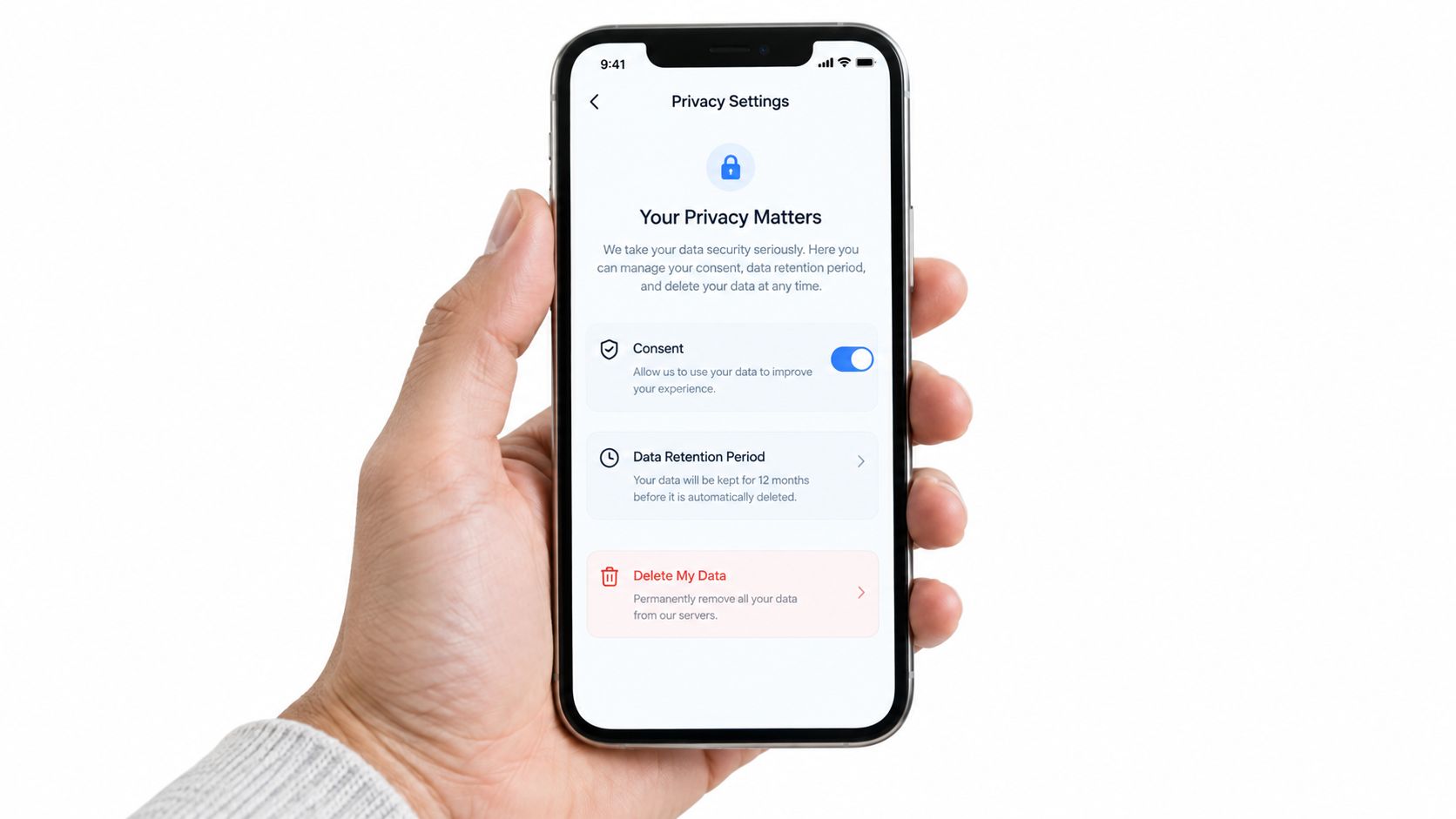
A retention window is the maximum period an organisation keeps data before deleting it or irreversibly anonymising it. Keeping a complete cycle history may support continuity, but indefinite storage increases the amount available if an account or system is compromised. Ask whether the service explains its retention periods for BBT logs, LH results, weight records, backups and inactive accounts.
Anonymisation needs care. Removing your name doesn't automatically make a detailed health record anonymous if other information could identify you. The service should explain what it means by anonymised, who receives the information and whether the process can be reversed.
In Australia, the Privacy Act 1988 provides the federal privacy framework and the Australian Privacy Principles. APP 12 addresses access to personal information, while requests to correct or delete information depend on the organisation's policies and applicable obligations. A deletion request may not remove every copy immediately where a legal hold or active dispute requires preservation, but those exceptions should be explained rather than hidden.
A useful account screen would group the controls, include a Download my data button, show connected services and provide a clearly labelled Delete account path. The Venus Health data deletion page is a practical place to check the available process. If you use a product such as the Venus Ovulation Predictor Test Kit, the result can still be logged manually or kept outside an app, depending on your preference.
You should be able to withdraw consent for a specific use without losing features that don't depend on that permission. Turning off marketing shouldn't prevent access to your existing chart, and disconnecting a partner integration shouldn't automatically mean deleting your account.
If you'd like to see how privacy settings can be presented in a user-facing experience, this short walkthrough offers another visual reference.
Where Australian Health Data Breaches Actually Come From
Australian breach data shows why data security can't focus only on dramatic hacking scenarios. The OAIC reported 1,205 notifiable data breach notifications in calendar year 2025, compared with 1,112 in 2024, an increase of 8%. 716 notifications were attributed to malicious or criminal activity, and health service providers accounted for 225 notifications, or 19% of the total. These figures are reported by the Office of the Australian Information Commissioner.
The Australian system has measured reportable breaches since the Notifiable Data Breaches scheme began in February 2018. In January to June 2025, the OAIC recorded 532 breaches, with 59% caused by malicious or criminal attacks and 37% caused by human error. The OAIC's January to June 2025 statistics also show why process design matters alongside technical defences.
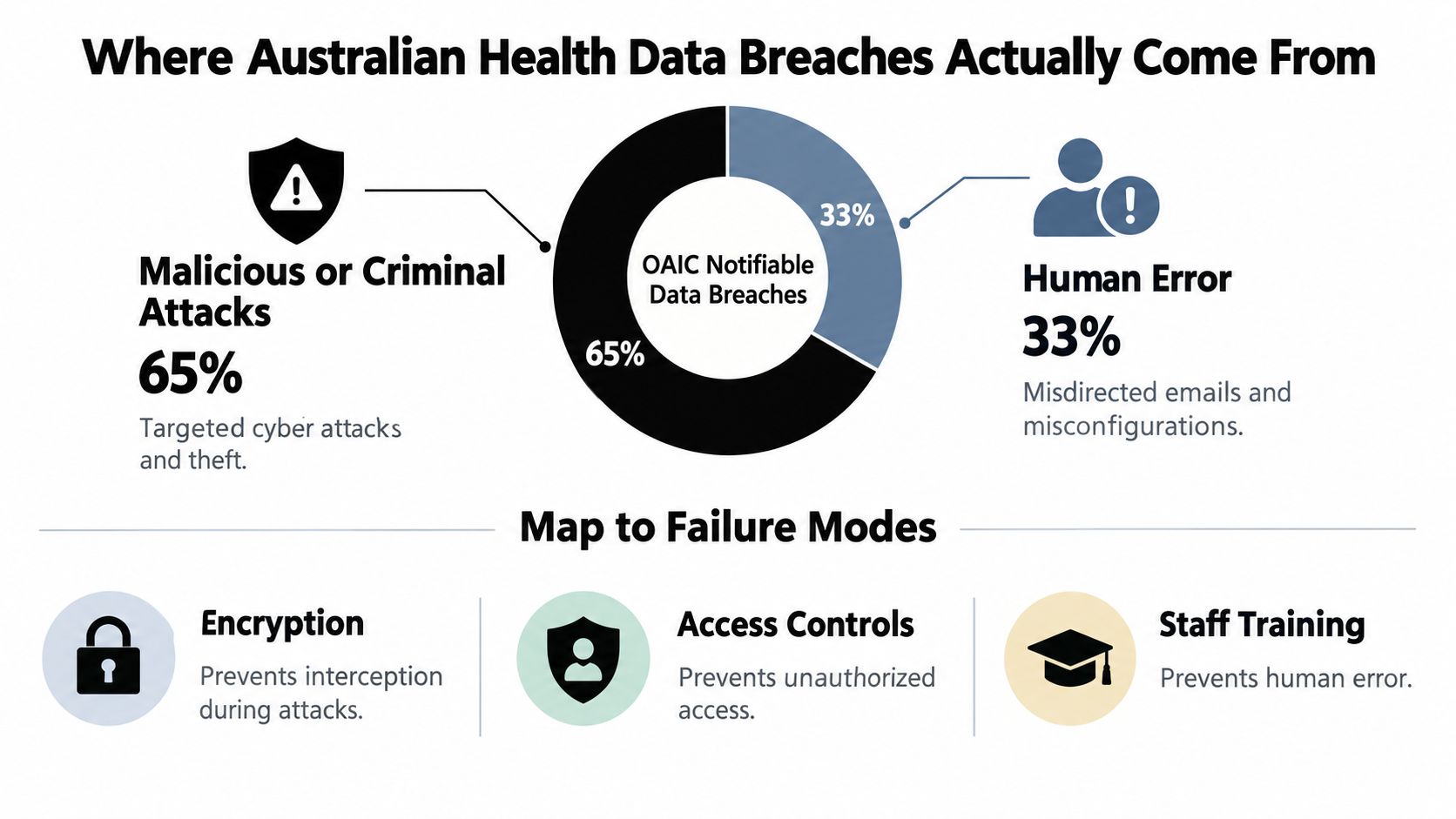
Ordinary mistakes can expose sensitive records
Consider a clinician preparing a fertility summary. They select the wrong contact from an autocomplete list and send the message to another person. Encryption may protect the message during delivery, but it can't correct a wrong recipient. Recipient checks, restricted sharing, staff training and a clear reporting process address that operational failure.
A lost phone creates a different chain of risk. Device encryption and a strong passcode help protect locally stored readings, while remote-lock features can reduce exposure after loss. If an employee's account is involved, role-based access and audit logs can reveal unusual record activity and limit how much information that account can reach.
Attack controls still matter
Malicious attacks remain a major part of the picture. The OAIC's January to June 2024 report recorded 527 notifications, which was the highest half-year total since July to December 2020 and 9% above the prior half-year. Cyber security incidents caused 38% of those notifications, and one incident affected over 10 million Australians, as documented in the OAIC January to June 2024 report.
The OAIC's 2024 breach cycle recorded malicious or criminal attacks as 69% of notifications. Phishing accounted for 34%, ransomware for 24%, and stolen or compromised credentials for 20%, according to the OAIC's 2024 data breach statistics. MFA helps with stolen passwords, encryption helps with exposed storage and backups, and isolated recovery copies help organisations respond to ransomware.
Human error also deserves attention. UpGuard's discussion of Australian breaches notes that, in January to June 2025, human error reached 37%, up from 29% in the prior period, while the average cyber incident affected just over 10,000 individuals. Its analysis of Australia's biggest data breaches also highlights why misdirected emails, wrong recipients and weak internal processes need practical controls, not only more software.
The pattern is mundane in hindsight. A wrong address, a reused password, a stolen device or excessive internal access can each turn a private reading into a privacy incident. Short retention, limited permissions, careful processes and layered technical safeguards reduce the blast radius.
Practical Privacy Habits for Everyday Venus Health Users
You can make useful improvements in the next ten minutes. Work through these five habits in order, and stop when a step doesn't apply to your phone or app version.
- Review phone permissions: Open the phone's privacy settings and check whether the app has access to the camera, microphone, location or background activity. Keep permissions needed for a feature you use, and revoke access that has no clear purpose.
- Protect the device itself: Turn on a passcode, Face ID or a strong device PIN. This is the first barrier protecting cycle logs if your phone is lost or left unattended.
- Add an app-level lock: Check whether Venus Health offers an in-app PIN or biometric lock. A second lock can help when you hand your unlocked phone to a partner, child or health professional.
- Audit connected services: Review Apple Health, Google Fit, Google Health Connect, Samsung Health or partner clinic connections. Disable integrations you're not actively using, then confirm what happens to data already synchronised.
- Hide sensitive previews: Adjust lock-screen notifications so BBT readings, fertility prompts or pregnancy-related hints don't appear where other people can see them. Notifications are easy to overlook because the phone may reveal them before the app opens.
Shared devices need a little extra care. Sign out after using a partner's tablet, and use private browsing when you must access an account there. Avoid entering symptoms or cycle details on public computers, where you can't verify the device or its stored browser data.
Small habit, lasting benefit: Make these checks a quarterly routine rather than a daily chore. Review them again after changing phones, adding an integration or sharing access with a clinic.
Bringing It All Together Without Becoming a Security Expert
Return to the morning reading beside your bed. The thermometer sends it to the app, the phone protects its local copy, TLS protects the connection, the service encrypts stored records, access controls limit who can view them and audit logs help identify unusual activity. Consent settings determine whether the reading remains inside the app or moves to an integration, clinic feature or other approved use.
You don't need to inspect every technical setting yourself. You do need to choose a unique password, enable MFA where available, protect your phone, review permissions and understand how deletion works. Those small decisions support the safeguards built by the service, but they don't replace a provider's responsibility to secure its systems.
For broader practical guidance, UpTime Web Hosting's cybersecurity and data protection advice offers useful principles that apply beyond health apps. You can also review the app's privacy settings, read the Venus Health privacy policy and consult the OAIC's guidance on health information. Privacy is maintained through regular attention, not a single checkbox.
Venus Health Co. offers app-connected tools for tracking body composition, weight, BBT, LH results and related health signals at home. Visit Venus Health Co. to review the available devices and app features, then check the privacy controls before you begin sharing your readings.